Welcome to Whitecaps!
The key for the bollard is on the house keys in the lockbox.
On this page you’ll find all the rest of the essentials for your stay. There’s also a whole load of information on the other pages of this website to make the most of your visit
Please read the Emergencies page to familiarise yourself and your guests on what to do if something unexpected happens
The Essentials
Wifi Details
The Wifi network name is PLUSNET-PJCFTR
Password is PUypnYcMUMha9q
If the router needs reset, you will find the socket in the bottom cupboard directly opposite the kitchen door
Central Heating
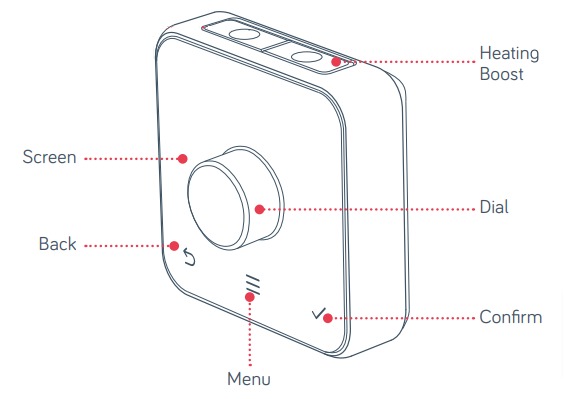
Whitecaps has a Hive heating system, controlled from the thermostat in the hall downstairs or from your phone. To control from the thermostat, simply:
1. Click the dial in toward the screen, which will activate the screen
2. Turn the dial to set your desired temperature
3. Click the Confirm tick
The heating will now stay at the temperature you have chosen
If you would like to control the Hive from your phone, please message/Whatsapp John on 07887 743522 from the mobile phone you would like to use and we will arrange access
Living on the Beachfront
Living so close to the beach is great, but there are times and places that you won’t want sand on or near you
Even if you haven’t been on the beach, you will have sand on and in your shoes. As soon as you take it into the carpeted rooms, it will find its way everywhere… On the carpets and couches… and worse – in the beds!
The best advice we can give is to only wear your shoes in the vestibule and the kitchen-diner when you’re inside
Flat Roof Area
The flat roof area doesn’t belong to us – please don’t go onto it
Velux / Roof Window Blinds
The second bedroom has 2 Velux roof window blinds. To lower the blinds, simply slide the grey bar down from the top to the height you’d like them
To open the blinds, all you do is push the grey bar toward the glass and they will roll back open themselves
If you’d like to open those windows, there are 2 handles on each that both need to be opened first – a conventional handle at the bottom of the window and a big bar at the top. Turn the handle and pull the bar, then the window will open
Just do the reverse to close and lock them
Showers
Both bathrooms have electric showers, which are powered by the pull-cords you’ll see attached to the ceilings
Iron, Ironing Board & Hairdryers
The iron and ironing board are in the cupboard in bedroom two
There are hairdryers in a drawer in the two main bedrooms
Kitchen Seating for Toddlers and Small Kids
If the stools are too high for your kids, you’ll find two smaller folding chairs and a smaller folding table in the corner of the kitchen, along with a high chair. There is padding for the high chair in the lower cupboard beside it.
There is also a baby gate in cupboard in bedroom 2.
Smoking
Neither of us smoke – please don’t smoke in our home
In front of the bantry wall (sea wall) opposite the front door to the left, there is a public bin with ashtray built in – there’s also a shelter just around that corner
Entertainment
TV
The power for the TV in the living room is behind it at the top right corner
The power for the bedroom TVs are to the bottom left of them
The TVs don’t have terrestrial channels, but do have apps that you can login to such as Netflix, Apple TV etc. Remember to logout before you leave so the next guests don’t mess up where you are in your series
Bluetooth Speaker
There’s a portable speaker in the kitchen
To switch on and off, just tap the power button quickly
To connect, hold the power button down for a few seconds then search for Anker Soundcore Bluetooth on your device
To charge it, open the cover on the left hand side and plug the USB-C charger into it
Cooking
Hob
The hob controls are built into it. They aren’t buttons that you have to press down – they feel your touch similar to a phone or tablet. Just hold your finger on the power button for a few seconds and it will switch on
Similarly, just touch the button for the hob you’d like to control, then lightly touch the temperature up and down buttons etc
The hob is induction, so it will not be hot to touch UNTIL you put a pan on it – then it will heat the pan and in turn the heat from the pan will heat the hob up and it will become very hot
Oven
The top left light indicates when the oven is on
Left hand dial is the function
Centre dial is the timer. Choose “M” for no timer
Right hand dial is the temperature selection
The top right light indicates the oven is heating up. It will switch off when the desired temperature is reached
Air Fryer
Cleaning
Bins
The bins are at the bottom of the stairs, numbered 22. The bin with the black lid is general waste and the blue bin lid is not for glass but is for all other mixed recycling
If you’d like to recycle glass, it has to be taken to the recycling centre
Brush and mop
There is a brush and mop in the tall kitchen cupboard opposite the kitchen door. A brush pan is under the sink.
Vacuum Cleaner & Carpet Cleaner
The vacuum cleaner is in the kitchen
If you’ve had a spillage on a carpet, there is a Vax spotwash under the kitchen sink. We really appreciate you cleaning it up if this happens
Simply plug it in, switch on, drag the nozzle over the stain a few times to get the worst of it up. Then pull the trigger to spray water onto the stain from under the nozzle, rub the water into the stain using the brush that’s attached under the nozzle and then drag the nozzle over the stain & water a few times to suck up the spillage. Repeat if necessary
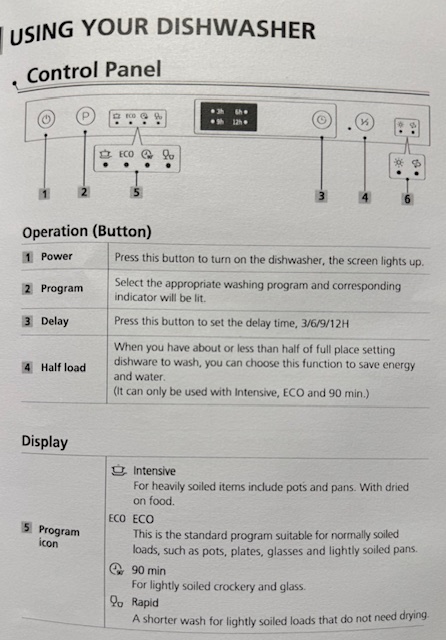
Dishwasher
There are dishwasher tablets under the sink
 Whitecaps eyemouth